
By Andrew · Prepared with AI assistance.
Before adding a lock demand forecast to an order quantity, ask whether the forecast already includes that order. Ask the same question about separately listed spare requirements. A planning total, an issued purchase order, and a spare-parts list may describe overlapping demand.
This guide helps B2B buyers prepare quantities for cabinet, drawer, furniture, mailbox, locker, and enclosure lock programs. It provides a way to reconcile the numbers before discussing another purchase with a supplier. It does not calculate the right inventory level or determine what a purchasing document authorizes.
Give Every Quantity a Basis
“Annual volume: 2,400” is incomplete. State the item reference, purchasing unit, start and end dates, forecast version, and whether the number describes total demand or demand still to be ordered. Record who supplied the figure and when it was checked.
Keep a supplier model reference connected to the buyer’s item. For a drawer lock purchasing brief, define what one purchasing unit contains through its agreed contents reference. Do not combine a forecast in complete sets with an order in individual pieces until the responsible owner confirms a common basis.
Use the same care with dates. A calendar-year total, a rolling three-month plan, and next month’s remaining requirement are different scopes. A delivery request date also needs its event: requested arrival at the buyer is different from requested dispatch by the supplier.
A quantity summary should retain the source wording. If a file says “remaining forecast” without defining what has been deducted, keep that uncertainty visible instead of treating the number as a fresh order request.
Classify the Records Before Combining Them
| Record | What to retain | Inclusion question |
|---|---|---|
| Total-period forecast | Version, item, unit, period, owner, stated coverage | Does it include orders already issued for this period? |
| Remaining forecast | The source’s definition of “remaining” and its calculation date | Which orders, receipts, or other quantities have already been deducted? |
| Issued purchase order | PO revision, line, quantity, and relevant schedule references | Which forecast row includes this order, if any? |
| Separate spare requirement | Item and unit, purpose, period, owner, and order status | Is this additional demand or a subset of the forecast? |
| Revised planning file | New version, superseded version, changed scope, and effective date | Does it replace the earlier figure or add a separately identified requirement? |
The table separates record types; it does not assign legal status to them. Keep any authority or commitment reference with the source document. A spreadsheet status should not substitute for the buyer’s purchasing approval or the supplier’s actual response.
Software settings also need checking. Microsoft’s forecast-reduction documentation describes methods where actual orders reduce forecast demand, as well as a method that leaves the forecast unreduced. This is a software example, not a rule for every buyer. Check the exported figure’s meaning before applying another subtraction in a worksheet.
Worked Example: Three Numbers, One Demand Total
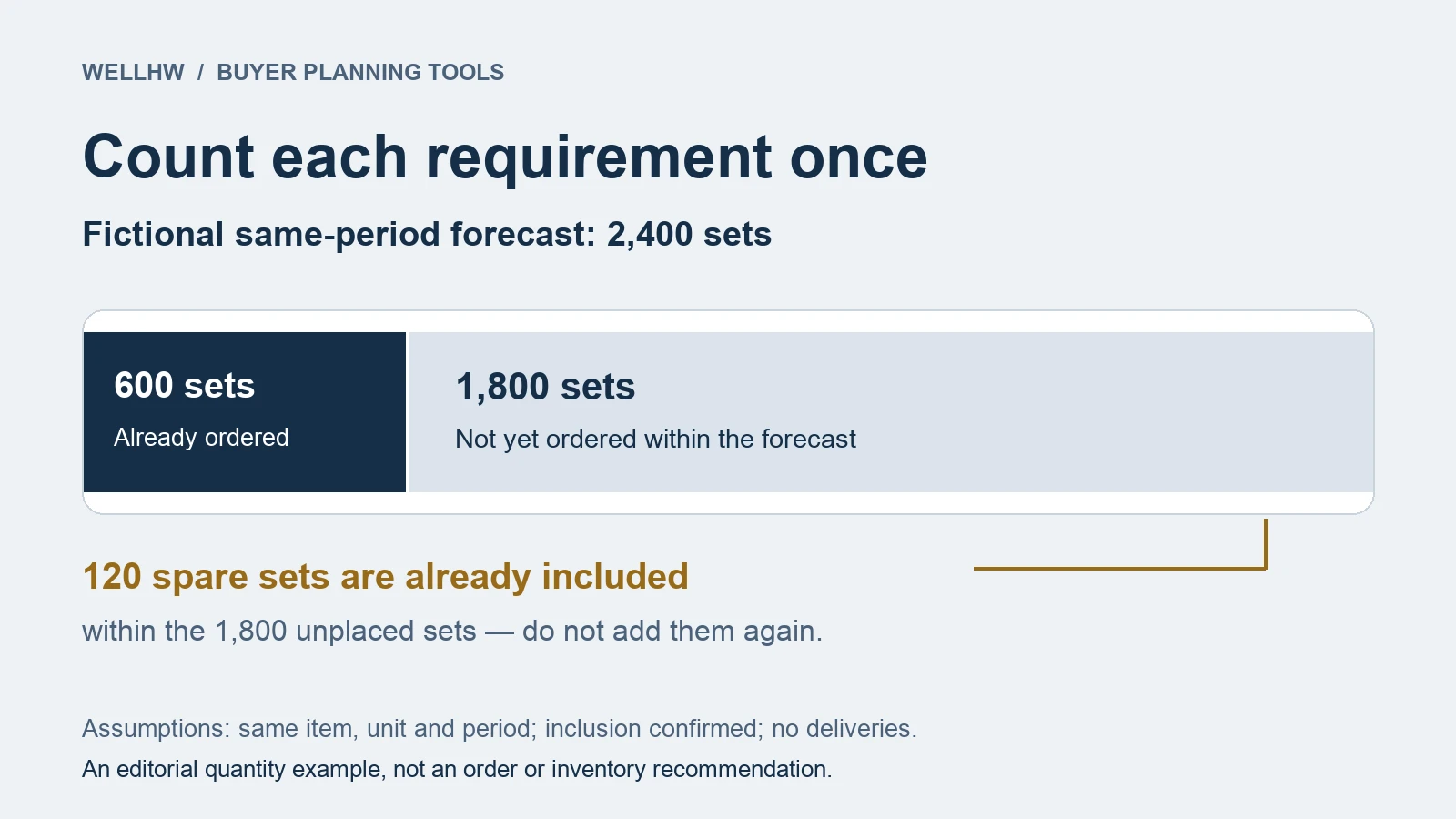
Fictional planning case: a buyer is preparing an upcoming-period summary for item DL-A. All figures use the same agreed set contents and the same period. No deliveries have occurred in this example.
- Forecast F03 states total demand of 2,400 sets.
- PO-17 covers 600 sets, all outstanding. The planning owner confirms those sets are included in F03.
- A service worksheet lists 120 spare sets, not yet ordered. Its owner confirms they are also included in F03.
Adding the three source numbers produces 3,120 sets. That total counts the ordered sets and spare sets twice. The reconciled view is:
Total-period forecast: 2,400 sets
Already ordered within that forecast: 600 sets
Forecast quantity not yet ordered: 1,800 sets
Of that unplaced forecast, 120 sets are the identified spare requirement.
The other unplaced forecast quantity is 1,680 sets.
The check is 600 + 1,680 + 120 = 2,400. The 120 spare sets remain visible as a purpose category within the unplaced forecast. They are not added on top. The 1,800 sets are a planning balance under these stated assumptions, not an instruction to order that amount.
This example contains no stock deduction, safety-stock calculation, loss allowance, or expected replacement rate. If your planning figure already accounts for receipts or available inventory, obtain its calculation basis before using this example’s subtraction.
Leave Uncertain Inclusion Open
If the spare owner cannot confirm whether 120 sets are included, show “inclusion unresolved” beside that source. Do not choose either a combined total or a subtraction merely to complete the summary.
Ask a precise question: “Does forecast F03 for DL-A include the 120 sets in service worksheet S02? Please identify the covered row and confirm the common period and unit.” Give the question an owner and response date. Keep the reply with the source versions it resolves.
If one order spans two planning periods, identify the portion assigned to each. If you cannot match an order to a forecast row, leave the relationship open. A shared supplier name or a similar item description is not enough to combine the quantities.
Replace Superseded Forecasts Without Losing the History
Continue the fictional case: F04 replaces F03 and raises the same-period total to 2,800 sets. The owner confirms that the unchanged 600 ordered sets and 120 spare sets are still included. The revised unplaced forecast is 2,200 sets, an increase of 400 from the earlier 1,800.
Retain F03 as the previous version and mark F04 as current. Do not add 2,400 and 2,800 together. Record why the figure changed, who confirmed its basis, and which recipients received the revision.
If the period, item, unit, or inclusion rule changes too, compare those fields before reporting a quantity increase. A longer planning horizon can change the headline total without representing an increase for the original period.
Copyable Quantity Planning Summary
Use one entry for each item, purchasing unit, period, and forecast version. Link order and spare rows to it. Fill unknown relationships explicitly; keep different bases separate until clarified.
Planning basis
Summary ID / owner / checked date: ____
Buyer item / supplier item / contents reference: ____
Purchasing unit / period start and end: ____
Forecast source / version / current or superseded: ____
Total-period or remaining quantity / exact source definition: ____
Quantity relationships
Forecast quantity: ____
Related PO revisions / lines / period quantities: ____
Orders included, excluded, or unresolved / evidence: ____
Spare source / quantity / ordered or unplaced: ____
Spares included, additional, or unresolved / evidence: ____
Other deductions already present in the source: ____
Reconciled planning balance / assumptions / exclusions: ____
Open question and next action
Source rows that cannot yet be combined: ____
Exact inclusion or basis question: ____
Responsible owner / response date / reply reference: ____
New version / replaced version / change explanation: ____
Permitted next action / authority reference / recipient: ____
Send a Planning Summary, Then Make the Purchasing Decision
Label what you are asking the supplier to review: an indicative quantity plan, a quotation request for a specified quantity, or a question about an issued order. Keep the supporting document references attached. Sending a revised forecast should not silently rewrite a PO in the summary.
When the buyer has selected a quantity to price, use the quotation comparison worksheet to check what the offer covers. After an order is issued, use the PO acknowledgment checklist to track the supplier’s response to that identified version.
For a quantity-planning inquiry to WELLHW, send the item and unit references, planning period, dated forecast version, related order references, and unresolved inclusion questions. State which figures are for discussion and which source documents the recipient should review.
Prepared with AI assistance for B2B purchasing coordination. All example quantities and references are fictional. Adapt the worksheet to your actual planning definitions and approval responsibilities.
