
A lock drawing transmittal register records which document revisions a buyer issued to a supplier, who was included, why the package was sent, and what response is still missing. It is useful when an OEM lock project moves from inquiry to sampling or a later controlled revision. The practical question is simple: can another person identify the exact version each supplier contact was asked to use? A file in a shared folder or an email thread does not answer that question unless the issue and recipient are identifiable.
This buyer-side tool tracks document exchange, not design correctness or production approval. Use the project’s actual authorized drawings and review process to decide those matters. If the dimensions themselves are still being defined, start with the cam lock dimension checklist. The register below deals with the later act of issuing a specific document version.
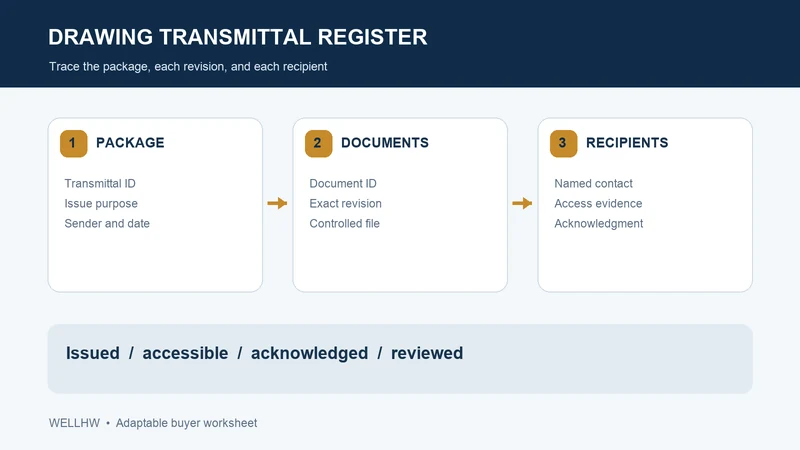
Give Each Issue a Purpose and a Fixed Contents List
Assign one transmittal ID and issue date to the package. State whether the files are being sent for quotation input, sample preparation, review, or information. These labels are examples; the buyer’s project rules decide what each issue authorizes. A recipient should not have to infer permission to make samples or release production from the mere presence of a drawing.
List every attached or linked document by ID, title, revision, file name or controlled location, and the item or project it concerns. Do this at the document level, because a single package may contain one revised drawing and several unchanged supporting files. If a referenced file cannot be accessed, keep that line open rather than assuming the recipient has the whole package.
Two published examples show how document identity can be recorded. Autodesk Docs’ transmittal report includes the sender, recipients, file versions, and recipient action statuses. J&E Hall’s drawing-office transmittal example lists document number, issue number, title, format, reason for issue, and file location. These are descriptions of their own systems, not a rule that WELLHW or every lock buyer uses the same form.
Record the Package, Documents, and Recipients Separately
Use a package header for the purpose and sender, a line for each document revision, and a recipient row for each person or approved shared destination. This structure lets the buyer answer two different questions: “Which versions were issued together?” and “Who actually received or acknowledged this issue?” A single “sent” checkbox cannot answer both when one recipient is missing or a file link fails.
| Level | Record | Question it answers |
|---|---|---|
| Package | Transmittal ID, project and buyer item, issue purpose, sender, issue date, prior package if any | What was this issue meant to do? |
| Document line | Document ID and title, exact revision, file name or controlled link, applicable item, prior revision if replaced | Which file version was included? |
| Recipient | Named recipient or approved destination, send channel and date, access evidence, acknowledgment and open question | Who has a usable package, and who still needs follow-up? |
Where a project uses a shared mailbox or portal, record the actual destination and the responsible person who can confirm access. Keep the issue record with the package snapshot or durable file references. A current folder may later contain a newer revision, so the register should preserve what the earlier issue pointed to at that time. Do not put confidential drawings, sensitive key information, credentials, or customer details into a public or broadly shared copy of the register.
Separate Sent, Received, Acknowledged, and Reviewed
Use status words that match evidence. Sent means the buyer issued the package through the recorded channel. Accessible means the recipient can open the intended files. Acknowledged means the recipient confirmed the named package or its listed revisions. Reviewed means an authorized reviewer has recorded an actual decision in the project’s review record. These are suggested administrative distinctions; they are not universal approval codes.
Do not convert an automated delivery notice into a recipient’s technical approval. Even an acknowledgment of receipt does not resolve whether a drawing meets the project requirements. Autodesk’s own transmittal interface distinguishes recipients and viewed/downloaded actions from file review status; that is a software example of the separate events, not a claim about every delivery channel.
If a recipient says “received” but cites a different revision, keep the identity mismatch open. Ask them to name the document ID and revision they can access. If the issue is tied to an RFQ question, use the RFQ clarification log for the question and answer; keep this register focused on the exact package and recipients.
Reissue a Changed File Without Rewriting History
When one document changes, create a new issue or a traceable supplement that identifies the replacement document and the earlier issue it affects. Keep the old entry as evidence of what was previously sent. State which recipients need the new version and what response is requested from each. If a supporting file remains unchanged, identify that fact instead of silently presenting the whole package as a new technical approval.
The issue record should say what was distributed; a separate authorized decision must say whether a change is accepted. For a repeat order that changes an approved baseline, the repeat-order change-control checklist owns the change disposition and effective boundary. This transmittal register helps verify that the resulting document version reached the right recipients. It does not decide the change for them.
Fictional Example: One Updated Drawing, Two Recipients
Fictional administrative example. A buyer issues package TX-14 for a cabinet-lock inquiry. It lists drawing D-14 revision B and a packing-reference file P-4 revision A. The stated purpose is quotation review. Two supplier contacts, a quotation owner and a sample coordinator, are named as recipients. The buyer retains the package list and send evidence.
The quotation owner acknowledges both files. The sample coordinator can open P-4 but reports that the link for D-14 still opens revision A. The register therefore shows one package sent, two listed documents, one recipient fully acknowledged, and one recipient with a drawing-version gap. It does not say the supplier as a whole acknowledged revision B, nor that revision B is approved for sampling.
The buyer sends a corrected link under a traceable follow-up to the sample coordinator and asks for confirmation of D-14 revision B. Once that recipient confirms the exact revision, the distribution gap can close. Any quotation change or sample approval remains in its own record. The IDs, people and events in this example are invented; they are not a WELLHW project.
Copyable Lock Drawing Transmittal Register
Copy the package header once. Repeat the document line for every file and the recipient line for every intended destination. Mark an unknown revision or missing acknowledgment as open with an owner and next check. Do not substitute “latest drawing” for an exact document ID and revision.
Package header
Transmittal ID / project / buyer item reference ____
Issue purpose / requested recipient action ____
Sender / issue date and channel ____
Prior transmittal or related decision reference ____
Controlled package snapshot or archive location ____
Repeat for each document
Document ID and title / applicable item ____
Exact revision / file name or controlled link ____
Replaces document and revision, if any ____
Included, missing, or access problem ____
Repeat for each recipient
Recipient name, role, organization, or approved destination ____
Issue channel and sent date ____
Access evidence and date ____
Exact package/revision acknowledgment and date ____
Open mismatch / owner / next action ____
Separate review or approval record reference, if later created ____
Before closing the distribution task, compare the document list with each intended recipient’s accessible version. A second buyer should be able to identify the last issue to each recipient and any unresolved revision gap without relying on memory. If the files are for a later sample, connect the confirmed package to the sample request brief by document ID and revision.
For a cabinet lock or other OEM inquiry, send WELLHW the project and item reference, document IDs and revisions, issue purpose, intended recipients, and the precise access or acknowledgment gap. Keep proprietary files in the agreed private channel. Send the scoped document question to WELLHW.
The status labels, example, and worksheet are adaptable editorial tools. Apply the actual project agreement, document controls, and approval responsibilities.
