
A lock sample feedback log gives a buyer one controlled response to a supplier’s development sample. Identify the sample and the documents used for review, combine comments from the people who examined it, resolve conflicting instructions, and request a specific reply for each open point. Use the log before any decision to approve a sample or release production.
This buyer tool is for cabinet, drawer, furniture, locker, and enclosure lock programs. It records communication and decisions; it does not set dimensions, acceptance limits, inspection methods, or product requirements. Those belong in the project’s approved documents and with its authorized reviewers.
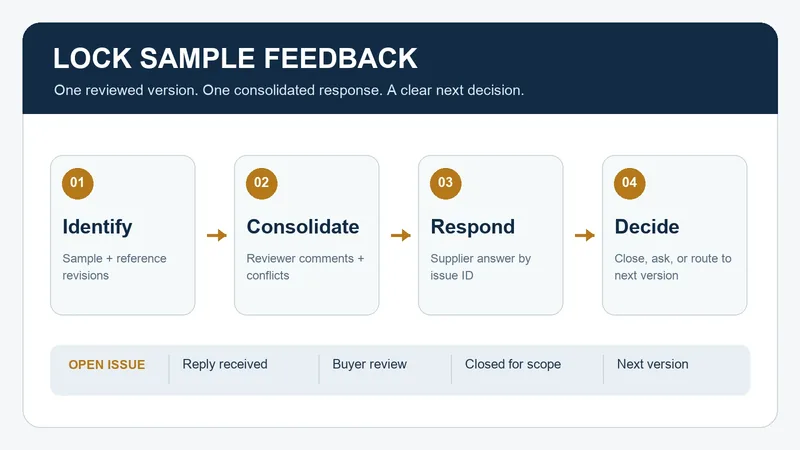
Define the Sample and the Review Scope First
Put the sample ID or label, received date, supplier reference, buyer item, and any review photos in the header. State whether this is a catalog, development, approval, or other project-defined sample. Identify the exact drawing, specification, artwork, and other reference revisions used by the reviewers. If a reference is missing, mark it missing and assign an owner; do not silently substitute an older file.
For a cabinet lock program, the header might identify a sample and its accompanying document package without claiming that the sample meets any requirement. A label such as “latest sample” is insufficient once another parcel or file arrives. Give each physical sample and document a reference that another buyer can find.
The ISO 9001 Auditing Practices Group’s educational guidance asks whether design reviews involve the relevant functions and whether revised inputs and outputs have been reviewed by people with the right responsibility. The buyer still chooses the review team and evidence for its own project. See the Auditing Practices Group’s design and development guidance.
Turn Separate Comments Into One Answerable Request
Collect each reviewer’s original observation before sending instructions to the supplier. Record who raised it, what sample and reference it concerns, and where supporting evidence is stored. Then appoint a buyer owner to consolidate the comments. Keep the source comments available, but send one numbered list so the supplier can answer the current set without guessing which email controls.
Do not merge different decisions into a vague sentence such as “please improve the lock.” Separate an observed difference, a requested change, and a question. If two reviewers disagree, leave the conflict visible for the buyer’s authorized decision. Neither reviewer should be represented as having approved the other’s instruction.
| Issue type | What the buyer records | What the supplier is asked to return |
|---|---|---|
| Reference unclear | The sample or document revision cannot be matched to the review package. | Identify the exact version used and provide the missing reference. |
| Observed difference | The point observed, the governing reference, and the evidence location. | Respond to that point and identify any proposed correction or explanation. |
| Buyer change request | The requested outcome and the person authorized to approve a revised requirement. | State the proposed next version and any affected document or commercial assumption for buyer review. |
| Reviewer conflict | The two instructions and the decision owner. | Wait for one resolved buyer instruction; do not choose between conflicting requests. |
This is an editorial routing table, not a universal acceptance system. A technical difference needs the project’s qualified reviewer to determine the criterion and evidence; the log only keeps the question and decision traceable.
Keep the Reply Separate From Acceptance
Give each item an ID, such as S-01. Record the supplier’s dated reply against that ID, including any file or next-sample reference. A reply received is a communication event, not a buyer acceptance. The buyer reviewer must record whether the response resolves the stated point, needs more evidence, changes the project requirements, or remains open.
Use simple states: open, reply received, buyer review needed, closed for stated scope, and superseded by later version. A closed entry names the evidence, reviewer, date, and exact sample or document scope. When a later sample changes the point, link the new entry instead of erasing the earlier response.
The same guidance asks whether a change request has an identified source, an evaluated impact, appropriate approval, and a documented result. This log applies those questions to sample feedback; it does not establish compliance with any standard. Read its change-control questions.
Worked Example: Two Comments, One Next Version
Fictional administrative example. A buyer receives sample LS-07 with drawing D-03 and package index P-02. The two reviewers do not yet have a sample-approval decision.
- S-01, missing reference. The review photo is labeled LS-07, but the supplier’s message names LS-06. The buyer asks which physical sample the message describes. The supplier confirms LS-07 in a dated response. The buyer checks the photo and label references and closes only the identity question.
- S-02, conflicting comments. One reviewer requests a different presentation detail; another asks to retain the current detail. The buyer records both comments and asks the authorized product owner to issue one instruction. The log remains at buyer review needed; the supplier receives no contradictory change request.
- Next version. After the product owner resolves S-02, the buyer sends consolidated feedback F-01. The supplier responds with a proposed LS-08 and identifies the document it expects to revise. The buyer records that proposal and the evidence needed at the next review. No approval of LS-08 or production release is implied.
The identifiers and events are invented to show the workflow. They are not a WELLHW customer case, test result, or statement of product capability.
Copyable Sample Feedback Entry
Use one header per sample and one issue entry per answerable point. Keep sensitive key, credential, and facility details in the project’s restricted channel, outside a broadly shared feedback form. Write “unknown” with an owner where information is incomplete.
Review header
Project / buyer item / supplier ____
Sample ID, label, purpose, and received date ____
Drawing, specification, artwork, and package revisions reviewed ____
Buyer owner / review participants / source-comment location ____
Repeat for each issue
Issue ID / source reviewer / observation date ____
Sample and governing reference ____
Observation or question / evidence location ____
Requested supplier answer or buyer decision ____
Conflict or dependency / decision owner ____
Supplier reply, date, and file or proposed next-version reference ____
Buyer review result / remaining evidence / next action and owner ____
State / closed scope / reviewer / closure date ____
Transmission and next round
Consolidated feedback revision / recipient / sent date ____
Supplier acknowledgment / unanswered issue IDs ____
Next sample or document version proposed ____
Review purpose and evidence required for the next round ____
Sample approval and production-release decisions: separate records ____
Before issuing the feedback, ask: can the supplier identify the exact sample, answer every issue ID, and distinguish a request for information from a buyer-approved change? Before closing it, can another reviewer find the reply and the buyer decision? If the answer is no, keep the item open and specify the missing reference.
Hand Off the Reviewed Result
When the buyer approves a particular sample, move its identity and approved comparison scope into the approved-sample retention record. If the project requires first-article inspection against released requirements, use a separate first-article inspection record. The feedback log preserves the development conversation; neither later decision is made merely by closing feedback entries.
To request a sample discussion with WELLHW, send the buyer item and sample reference, the revisions used for review, numbered open points, and the response you need for each. Name the person who can resolve conflicting buyer instructions. Send the sample feedback package to WELLHW.
The routing table, states, fictional example, and worksheet are original editorial tools. Apply your organization’s actual requirements and approval responsibilities.
