
By Andrew · Prepared with AI assistance.
A lock purchase order acknowledgment checklist helps buyers compare a supplier’s reply with the exact purchase order (PO) they issued. Check the order version, each item and purchasing unit, quantities, delivery schedules, and referenced attachments. Keep missing answers and proposed changes visible until the responsible owner records a decision.
Use this review for cabinet, drawer, furniture, mailbox, locker, and enclosure lock orders after the PO has been sent. The goal is a traceable response record: what the supplier answered, what differs, and what evidence supports the next handoff. Apply your project’s approval procedures; this worksheet does not determine the legal effect of an acknowledgment or authorize production.
Identify the Order Package the Supplier Received
Start with the PO number, revision, issue date, supplier reference, and the actual files sent. List the attachment names and revisions rather than writing “latest drawing” or “same as sample.” Ask the supplier to identify the package its response covers.
Keep the selected offer linked to the order, using the lock quotation comparison when needed. If the acknowledgment cites an older offer or a different PO revision, clarify that reference before reviewing the rest of the response as a match.
For drawer lock orders, distinguish the buyer’s item reference, the supplier’s model reference, and the agreed purchasing unit. A reply for loose lock bodies does not answer a PO line for complete sets unless the contents are explicitly reconciled. Record controlled component-list references rather than deciding technical equivalence from a product name.
Separate Receipt, Supplier Response, and Buyer Review
For this worksheet, use separate fields for three events:
- Message received: the PO reached a named recipient or system. Record the transmission evidence and the version identified in that reply.
- Supplier response: the supplier states agreement, proposes changes, rejects an item, or leaves a field unanswered. Preserve the actual wording and source.
- Buyer review: the authorized owner records whether each difference is resolved and which version supports the next action.
A short “received, thanks” reply gives little detail about the order lines. Ask for the missing response instead of filling the gaps from memory. Similarly, a system label such as “confirmed” needs a source showing the lines, schedules, and version it covers.
Microsoft’s vendor collaboration documentation illustrates separate responses for acceptance, rejection, and acceptance with changes. It also describes proposed changes to quantities, dates, split deliveries, and items. This is a software example, not a rule that every supplier uses the same statuses.
Review Every Line and Its Delivery Schedule
Give each PO line a review row. If one line has several delivery schedules, add a row for each schedule. Record both the ordered value and the supplier’s response so a changed date or unit cannot disappear behind an overall “OK.”
| Review field | What to compare | What to do with a difference |
|---|---|---|
| Order and item identity | PO revision, line, buyer item, supplier reference, referenced specification revision | Request an explicit reference correction. Route any proposed product alternative to the authorized technical owner. |
| Purchasing unit and contents | Piece, set or pack; included-part and accessory references | Clarify the contents and unit before reconciling quantities. |
| Quantity and schedule coverage | Ordered quantity, each response quantity, omissions, rejected lines and proposed splits | Keep uncovered quantities and proposed changes open. Do not count a split twice. |
| Date and event | Requested and stated date, whether it describes dispatch or receipt, named location and stated conditions | Ask for the same event and location basis. Record a proposed date as a difference for buyer review. |
| Commercial fields | Price basis, currency, separately stated charges, payment and delivery wording | Record the exact discrepancy and refer it to the authorized commercial owner. |
| Packaging and documents | Pack-reference revision, label/artwork reference, required document list and response coverage | Identify unanswered references. Obtain the applicable review rather than assuming the attachments were accepted. |
Use “matches issued reference,” “difference proposed,” “rejected,” or “not answered” for the supplier-response comparison. Add the buyer’s decision separately. These are editorial tracking labels, not product acceptance ratings.
Read notes and attachments as well as the main table. A schedule can look unchanged while a note makes it conditional on another event. Record that condition with its owner and the evidence needed to resolve it. This review records the supplier’s statement; it does not verify capacity or establish a delivery guarantee.
Worked Example: All Quantities Covered, One Date Still Open
Fictional administrative example: PO line 10 requests 900 complete lock sets for receipt on November 16, 2026. The supplier replies with 600 sets for that date and 300 sets for receipt on November 23. Both replies reference the same item and purchasing unit. The dates and quantities are teaching inputs, not WELLHW offers or commitments.
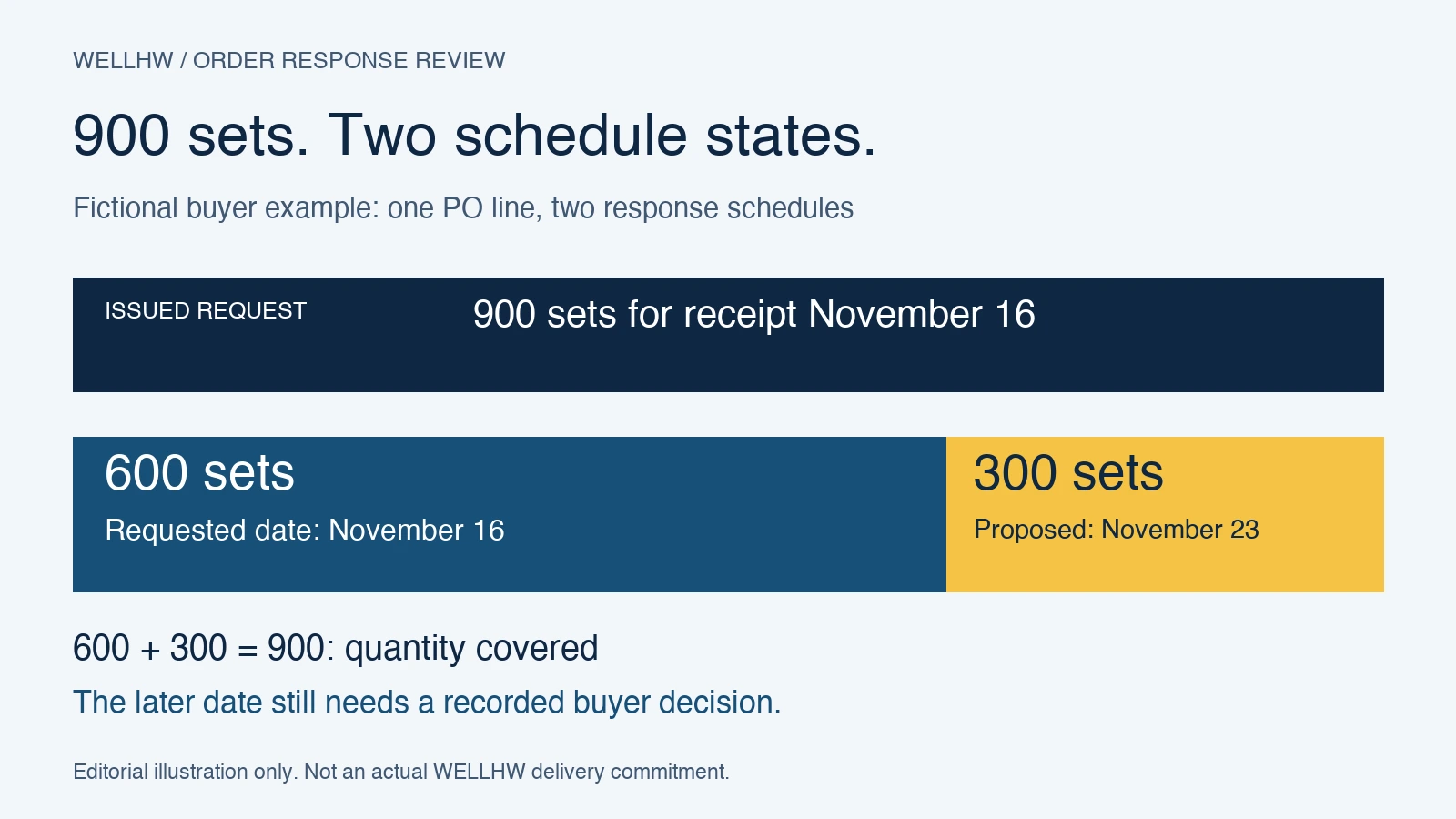
The total response quantity is 900, so no quantity is omitted in this example. The requested date is covered by only 600 sets. Record the other 300 as a proposed schedule difference, with a buyer owner and a required decision. Do not describe the whole line as matching the issued PO.
If the authorized buyer accepts the split under the project’s procedures, record the decision and issue the revised order through the applicable control process. Obtain a response identifying that revision and both schedules. If the split is declined, request a corrected response or document the next authorized action. Keep the original reply so the history remains understandable.
A revised response that covers only the first 600 sets leaves the other 300 unanswered, even if its header says “order confirmed.” The closure check is line-and-schedule coverage, not the document title.
Copyable Acknowledgment Review Record
Use one header per issued order version, then repeat the line and exception entries as needed. Keep source references short enough that another buyer can find the original evidence without copying confidential files into a widely shared tracker.
Order package
Review ID / buyer owner / review date: ____
PO number / revision / issue date / supplier: ____
Selected quotation reference / applicable attachments and revisions: ____
Transmission reference / recipient / sent date: ____
Supplier reply reference / date / order version acknowledged: ____
Line and schedule comparison
PO line / schedule ID / buyer item / supplier item: ____
Purchasing unit / contents reference: ____
Ordered quantity / response quantity / unanswered quantity: ____
Requested date, event and location: ____
Supplier date, event, location and conditions: ____
Supplier-response comparison state / evidence reference: ____
Exception entry
Exception ID / affected line, schedule and quantity: ____
Issued value or reference / supplier’s proposed value: ____
Clarification question / supplier response reference: ____
Technical or commercial decision owner / target review date: ____
Decision / authority reference / covered scope / remaining conditions: ____
Closure and handoff
Revised PO reference, if required / supplier response to that version: ____
All lines, schedules and required fields answered? / open exceptions: ____
Other required project approvals / evidence references: ____
Next action / authorized owner / permitted scope / date: ____
Record location / superseded versions retained: ____
Store sensitive key identifiers, credentials, bank details, and proprietary technical files in the project’s authorized systems. The review record usually needs their controlled reference and owner, not the confidential content.
Close the Response Against One Identified Version
Before marking the review complete, trace every PO line to a response, every delivery split to its quantity and date, and every exception to an authorized decision. If an answer is still missing, leave that scope open and record the next action. Partial review is useful when its boundaries are explicit.
Microsoft’s purchase order confirmation documentation describes journals that preserve confirmed order versions. Your team can apply the recordkeeping principle without adopting that software: retain the issued version, supplier reply, decision, and any revised package together.
Route changes to an existing approved configuration through the repeat-order change-control review. Keep engineering and quality evidence linked through the supplier document checklist. An aligned acknowledgment does not replace those separate approvals.
For a WELLHW order clarification, use the project inquiry route with your PO and line references, issued revision, supplier reply reference, the specific mismatch, and the answer you need. Redact confidential information that is unnecessary to that question.
Prepared with AI assistance as an adaptable buyer tool. The worksheet and fictional schedule example are editorial material, not a WELLHW internal procedure, customer case, technical approval, or legal interpretation.
