
A useful lock inspection photo record connects each image to an order, item, sample, observation, and open question. Give each source image an ID, label any review copies, and record what the recipient still needs to clarify.
This buyer tool is for procurement, warehouse, and quality teams sharing photographs of cabinet, drawer, mailbox, locker, or enclosure lock orders. Use it when the pictures need explanation before a supplier discussion can move forward. It organizes attachments; the project’s authorized reviewers still decide technical acceptance, cause, and disposition.
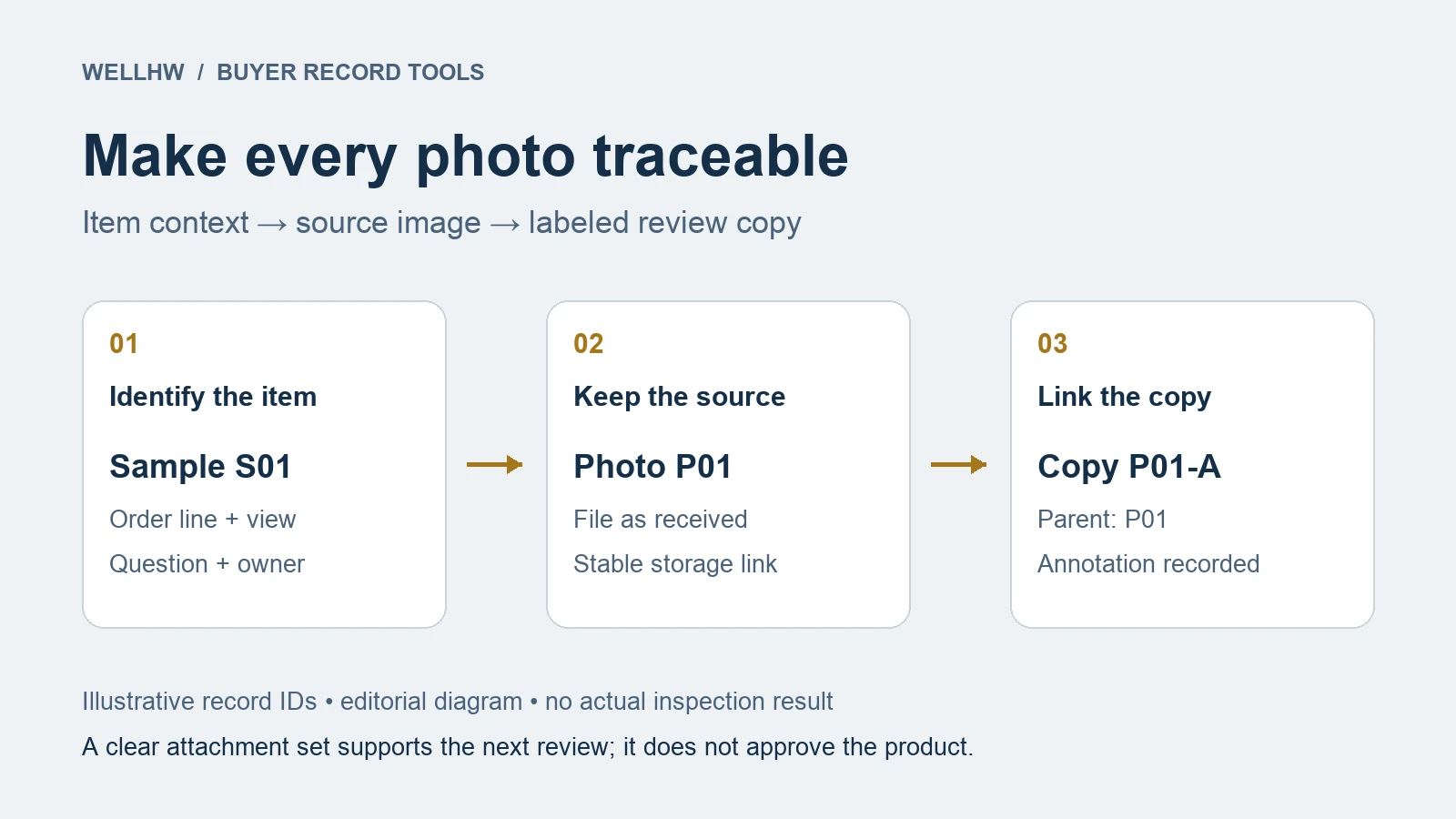
Start with the Question and the Pictured Item
Write the question before choosing the attachments. “Please review these locks” leaves the recipient to guess. “Please confirm which item reference belongs to sample S01; the received label and our order line use different references” defines an answerable task.
Give the physical sample a temporary ID if it has no existing identifier. Keep that temporary ID distinct from the supplier’s part number. Record the relationship as unknown when you cannot establish it; do not rename an uncertain item as though its identity were confirmed.
For a cabinet lock order, a picture of a similar-looking unit should not become the item reference. Link the order line, supplier reference, sample ID, and available label record. State which connections the sender has checked and which the supplier must resolve.
ASQ’s check-sheet guidance recommends defining the observation and labeling the fields used to collect it. Apply that discipline here: make the question and identity fields clear before collecting more files. The template below is an adaptable editorial tool, not an ASQ form or a prescribed inspection procedure.
Choose Views That Answer Different Questions
Agree on the views needed for this particular question. An overview establishes context; a detail points to the reported area; a label view records an identifier. Connect them with the same sample ID so the recipient can follow the set without relying on file order.
| View | Record with it | Question it helps answer |
|---|---|---|
| Item overview | Sample ID, order line, and visible item context | Which submitted object does the detail belong to? |
| Reported area | Same sample ID, view description, and observation reference | Where should the reviewer look? |
| Label or packing reference | Which label or package was pictured and how it relates to the sample | Which identifier was actually visible? |
| Requested follow-up | The earlier photo ID and the exact missing view or unreadable text | What information is still missing? |
Use the table as a planning aid, not a mandatory shot count. Omit views that do not help the question. If a label was photographed separately, record who linked it to the sample and the basis for that link. A label image alone leaves that relationship unresolved.
Use neutral captions: “Text on the photographed label is not readable” describes the attachment. “Supplier used the wrong label” adds a conclusion that may still need review. Keep the observation, the sender’s explanation, and the requested decision in separate fields.
Keep Source Files and Review Copies Distinct
Keep the file as received and give it a stable photo ID. Record the original filename, sender, received date, and storage location. If the only file available is a chat screenshot, identify it that way and mark the source photo as unavailable.
A crop or arrow can make a discussion easier to follow. Save it as a separate review copy linked to its source ID. Record the change: “crop of upper label” or “arrow added to locate reported area.” Do not silently replace the received file or add, remove, or generate apparent product details.
This distinction matters even with ordinary editing software. Adobe’s Lightroom export documentation explains that exports create new image files containing edits. Treat the exported discussion image as a related file and retain the source separately.
Use a stable record ID rather than repeatedly renaming files “final.” For example, photo P02 can have review copy P02-A. A newly received photograph gets a new photo ID; it does not inherit P02 merely because it answers the same question.
Build a Photo Index the Recipient Can Use
Create one row per source photo and one linked row per review copy. The index can live in a shared worksheet or case system. It should let a colleague retrieve the attachment and understand its purpose without searching a chat history.
- Case and scope: case reference, purchase order and line, item references, sample ID, and known lot or carton reference.
- File identity: photo ID, filename, source or review-copy status, parent photo ID where applicable, and storage link.
- Origin: sender, received date, and stated capture date if supplied. Keep the stated capture date separate from receipt date; mark it unknown when unavailable.
- Meaning: view, factual caption, related observation or report reference, and exact question.
- Follow-up: missing information, owner, requested response date, reply reference, and attachment-review status.
Use statuses such as “identity clarification needed,” “replacement view requested,” and “ready for assigned reviewer.” Reserve product acceptance or stock decisions for their proper records. When the question began at delivery, link the receiving discrepancy record instead of copying its quantities into every photo row.
Check that the intended recipient can open the shared files. Remove unrelated personal or confidential material from a clearly labeled sharing copy where needed, while retaining the restricted source appropriately. Keep key-cut details, credentials, and sensitive access information out of ordinary shared photo sets.
Worked Example: Resolve an Unclear Label Connection
Fictional example: CASE-P17 concerns order line CL-A. The buyer has two physical samples, S01 and S02. Photo P01 shows the overview of S01. P02 shows a close-up of a label, but its caption does not say which sample or package the label belongs to.
The buyer creates P02-A with an arrow pointing to the text in question. That copy helps locate the text, but it does not resolve the missing relationship. The index keeps P02 as the received source, lists P02-A as its annotated copy, and leaves the sample field for P02 as “unconfirmed.”
The follow-up request asks the sender to identify the pictured label and explain its relationship to S01 or S02. If another view is needed, it asks for that view with the sample ID visible in the agreed context. The reply and new image are added to the record; the original uncertainty remains visible in its history.
When the relationship is clarified, the attachment set can move to the assigned reviewer. That change means the files are understandable enough for the next review. It does not mark either sample accepted or determine why the references differ.
Copyable Photo Record and Clarification Request
Copy this block into your case record. Use one photo entry per file, including review copies. Replace blanks with known information or “unknown”; do not fill gaps by assuming that neighboring files show the same sample.
Case header
Case / purchase order / line: ____
Buyer item / supplier item references: ____
Sample IDs / known lot or carton references: ____
Review question / assigned reviewer: ____
Photo entry
Photo ID / filename / file link: ____
Source file or review copy / parent ID: ____
Sender / received date: ____
Stated capture date / unknown: ____
Sample ID / identity basis / unresolved connection: ____
View / factual caption / related observation: ____
Changes made to a review copy: ____
Missing information / owner / status: ____
Reply / new-photo reference / checked by and date: ____
Clarification request
For case ____ and photo ____, we can identify ____. We cannot yet identify or read ____. Please provide ____ and state its relationship to sample ____. Keep the existing file reference in your reply and identify any new attachment. Requested response date: ____. Reply owner: ____.
Hand Off the Photos with a Clear Review Boundary
Before sending, ask a colleague to match one detail image to its overview and retrieve its source. If that simple trial fails, fix the index or file access first. Send the unresolved questions alongside the usable attachments so missing information stays visible.
If the case needs investigation, pass the indexed set into the supplier corrective action record. Keep the photo index focused on file identity, context, and follow-up. Investigation, technical evaluation, and authorized decisions belong with their responsible owners.
For an order question to WELLHW, send the order and item references, sample IDs, indexed photographs, and the exact point that needs clarification. Identify what is known, what is still uncertain, and which response you need next.
Prepared with AI assistance for B2B record preparation. The sample identifiers and worked example are fictional. Adapt the template to your project’s document controls and review responsibilities.
