
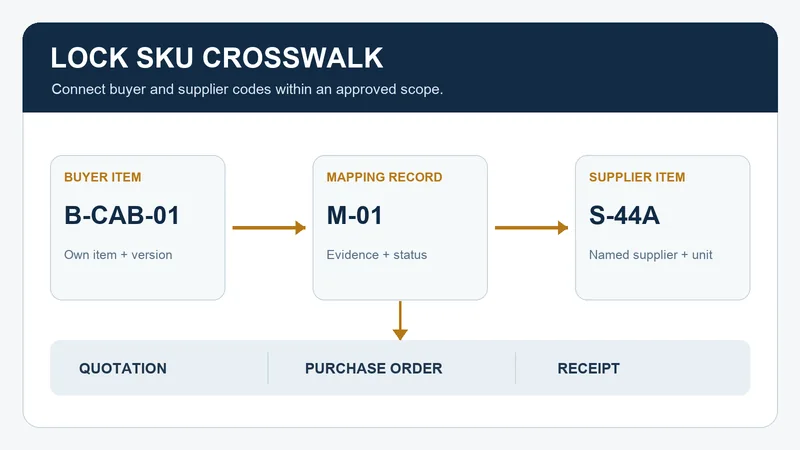
A lock SKU crosswalk records which buyer item code corresponds to which supplier item code for a stated order scope. SKU means stock keeping unit. A useful crosswalk names the supplier, buyer item, supplier reference, version or configuration boundary, purchasing unit, evidence for the association, owner, and effective status. It lets a buyer compare an offer, issue an order, and review a receipt without relying on a product nickname or an old email.
This is a buyer-side record for distributors and manufacturers managing several cabinet lock items, drawer locks, furniture locks, or enclosure locks. It identifies references; it does not establish that two locks are technically interchangeable or approved for an application.
Why a Separate Item-Number Record Helps
A buyer’s item number and a supplier’s part number can both appear in purchasing records. Microsoft Dynamics 365 documents customer and vendor external identifiers that can be associated with a released product or variant; Oracle describes cross-references between internal and trading-partner item numbers. These are examples of how purchasing systems represent the relationship, not a claim that WELLHW uses either system. See Microsoft’s product-identifier documentation and Oracle’s item cross-reference overview.
The crosswalk should be maintained before a buyer treats a supplier code as a match. The quotation comparison checks one offer against a request. The crosswalk keeps the accepted identifier relationship available for the next offer, purchase order, and receipt. A quote line that merely repeats a supplier catalog code is evidence of what was quoted, not evidence that it covers the buyer’s intended item.
Define the Mapping Key and Its Boundary
Start with the buyer organization and item code, then add the supplier identity and supplier item code exactly as supplied. If the buyer’s item has separate versions or variants, identify the approved reference that distinguishes the one being mapped. Record the purchasing unit and its contents reference so a code for one piece is not silently treated as a code for a set or carton. Use the project’s actual controlled documents rather than inventing a specification in the crosswalk.
One row should have one unambiguous buyer item, one named supplier, and one supplier item reference for the stated scope. A supplier may use one code for several presentations, or a buyer may use different codes for items a supplier considers related. Neither situation is an automatic match. Put the relationship in pending clarification until the buyer’s authorized owner records the differentiating reference and approves the mapping.
| Situation | Record it as | Next buyer action |
|---|---|---|
| Both codes and scope agree | One proposed mapping, with source file and revision | Have the owner review the association and set its effective status. |
| Supplier code covers more than one buyer item | Ambiguous; list every affected buyer line | Ask for the reference that distinguishes each item. Do not select one by description alone. |
| Supplier changes a code | Old and proposed new code, effective boundary, affected open orders | Review the change and record where each code remains valid. |
| Same code, changed configuration or pack | Potential scope change, even if the printed code is unchanged | Route the proposed change to the responsible reviewer before continuing to use the mapping. |
The statuses are an editorial control scheme: pending clarification, approved for stated scope, superseded, and retired. Approval here means that an authorized buyer has accepted the identifier association for a defined scope. Product acceptance, key-system decisions, and technical fit require their own evidence and decisions.
Fictional Example: One Supplier Code, Two Buyer Lines
Fictional administrative example. Buyer RFQ R-21 has two cabinet-lock item lines, B-CAB-01 and B-CAB-02. The supplier’s offer Q-08 lists code S-44 on both lines but does not identify which package reference applies to each. The buyer does not assign S-44 to either item in the approved crosswalk.
- The buyer opens mapping questions M-01 and M-02, each tied to its RFQ line and the offer revision.
- The supplier replies with a revised offer Q-09: S-44A for B-CAB-01 and S-44B for B-CAB-02, citing package references P-01 and P-02. The buyer records that answer as received, then checks the references through the project’s authorized review.
- Once the owner accepts the two associations for the stated versions and purchasing units, the crosswalk gets two approved rows. Q-08 remains in the history. A later change to P-02 reopens only the affected mapping until reviewed.
All codes, files, and events are invented. The example does not show a WELLHW order, product result, or interchangeability decision.
Copyable Lock SKU Crosswalk Entry
Repeat this entry for each buyer item and supplier relationship. Put “unknown” and an action owner where a field is missing. Keep sensitive key, credential, and facility information in an authorized channel rather than a broadly distributed item master.
Identity and scope
Crosswalk ID / buyer organization / buyer item code ____
Buyer item version or configuration reference ____
Supplier legal name or account / supplier item code ____
Supplier description as received / catalog or offer source ____
Purchasing unit / contents or packaging reference ____
Evidence and decision
Source document, revision, line, and received date ____
Buyer reference used to check the association ____
Unresolved difference or ambiguity / question ID ____
Decision owner / reviewer / decision date ____
Status / approved scope / effective date or order boundary ____
Maintenance and transaction trace
Superseded code or mapping / successor crosswalk ID ____
Open RFQ, quote, PO, shipment, or receipt affected ____
People or systems notified / notification date ____
Next review trigger and responsible owner ____
Before approving a mapping, test whether a second buyer can trace the two codes to the same stated item and purchasing unit using the cited records. If the supplier has not identified the version or contents, leave the association pending. Do not use a crosswalk row to waive a missing drawing, sample, or product approval.
Use the Crosswalk at Each Handoff
At quotation review, compare each supplier line with the buyer request and record any unmatched code. At order issue, use only the mapping and scope accepted for that order. At acknowledgment, check that the supplier’s response still cites the intended buyer and supplier lines; the PO acknowledgment checklist owns that transaction review. At receipt, keep both item codes available for the receiving team while it checks the delivered documents and package labels.
If a repeat order uses a different code, version, or pack reference, review the proposed change through the repeat-order change-control checklist. Retain the old mapping with its effective boundary so historical records remain interpretable.
For a WELLHW item-code discussion, send the buyer item codes, relevant item or package references, supplier codes shown in the current offer, purchasing unit, and any lines that still have more than one possible match. Name the buyer owner who can approve the mapping. Send the item-reference question to WELLHW.
This is an adaptable purchasing tool. The decision table, fictional example, and worksheet are original editorial material. Apply your organization’s actual item master and approval rules.
