
A lock field issue intake record captures the first report of a possible post-delivery problem before the buyer decides what happened or what remedy applies. For a cabinet, furniture, mailbox, locker, or enclosure lock program, it should preserve the reporter’s account, the affected order and item references, what is known about the scope, the available evidence, the immediate owner, and the next question. An intake record is a starting point for review, not a defect finding or a warranty decision.
This buyer-side tool is for OEM procurement, quality, and after-sales teams receiving reports from an assembly line, distributor, installer, or customer. Use it when the first message is incomplete or arrives through several people. Keep the original report intact while building a shared case record.
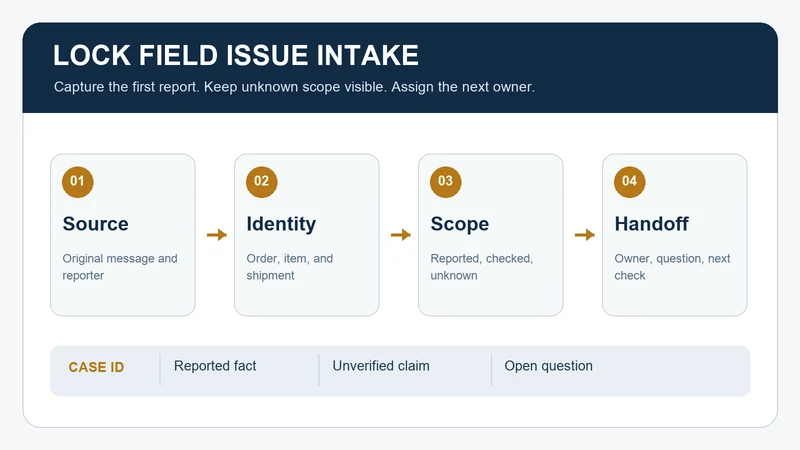
Give the Report One Case Identity
Open one case ID as soon as the issue is reported. Record when it was received, who reported it, their organization and role, the channel, and the exact wording or an attached copy of the original message. Record a contact who can answer follow-up questions and a buyer-side owner who will coordinate them. Microsoft Dynamics 365’s case-creation documentation illustrates fields for customer, origin, product, description, owner, priority, and status. Those are software examples, not WELLHW’s process or a required industry form.
Do not combine reports solely because they use the same phrase, such as “lock sticks.” Link potentially related cases and record why they may be related; leave the relationship unconfirmed until the order, item, and event references are checked. Conversely, if several emails describe one event, keep their message IDs under one case so the timeline remains visible.
Separate Reported Facts, Scope, and Unknowns
Ask for the buyer item code, supplier item code if known, purchase order and line, delivery or carton reference, and any lot or packaging identifier available under the project’s records. The item-code crosswalk helps align two naming systems; it does not prove that a reported unit belongs to a particular shipment. Record where the unit was observed and its installation or assembly context in ordinary terms, without sharing access credentials or detailed key information.
Keep three quantities distinct: reported affected, checked, and potentially exposed but unchecked. State the unit for each number and the source of the count. “Three reported from one carton” is different from “three confirmed defective in the whole lot.” If a count is missing, write “unknown,” name the owner who will check it, and set a follow-up point. Do not turn an unknown scope into a zero.
| At intake | Record now | Next owner action |
|---|---|---|
| Item or order cannot be identified | Original report, photos or files, possible references, and uncertainty | Ask the reporter for the label, order line, or other approved identifying reference before assigning scope. |
| Affected count is reported but unverified | Reported count, location, unit, and who counted it | Arrange a controlled count and record checked versus unchecked stock separately. |
| Several channels report what may be one event | Each message ID, date, sender, and proposed case link | Confirm whether the references describe the same event; preserve each original message. |
| Immediate product or use concern is alleged | The allegation, observed context, current stock/use state, and who was notified | Route promptly to the buyer’s authorized quality or safety owner for an interim decision; do not diagnose or promise a remedy in the intake record. |
The table is an editorial triage aid. Your contract, quality system, and responsible people determine actual escalation, containment, timing, and disposition. A return instruction should be recorded only after the authorized party has made that decision.
Request Evidence Without Rewriting the Report
Ask for a short description of what was expected and what was observed, when and where it was observed, and whether the issue is repeatable as reported. Request the original image or document file, the view it shows, its date or source, and the related case reference. If an image lacks a usable item or location reference, ask for a new context image while retaining the first file. The inspection photo record provides a more detailed image index when review moves beyond initial intake.
CNC24’s published complaint form asks for delivery and order references, a part and article number, affected and measured quantities, a problem description, and supporting photos or drawings. That is a narrow example of useful intake evidence, not a WELLHW policy, technical test method, or warranty rule.
Keep “reported,” “observed by buyer,” and “confirmed by responsible reviewer” as separate labels. A photo may show a condition but may not establish the cause, the full affected population, or technical nonconformance. Avoid circulating key codes, credential records, site access details, or identifiable customer information beyond the authorized case team.
Fictional Example: Two Messages, One Unconfirmed Scope
Fictional administrative example. A furniture assembler reports that two units from carton C-07 are difficult to operate after assembly. A distributor then forwards a photo of one unit and writes “same batch,” but gives no carton or order reference. The buyer creates case F-12, logs both messages with their original dates, and records “two units reported from C-07; one photographed unit of unconfirmed origin.” The buyer does not add the photographed unit to the affected count yet and does not label the entire batch defective.
The case owner asks the distributor for the order line and carton reference and asks the assembler for the observed condition and count method. The buyer’s quality owner decides whether any stock or use control is needed while the scope is checked. All codes, quantities, and events here are invented; they do not describe a WELLHW order or a product failure finding.
Copyable First-Report Intake Entry
Use one entry per distinct reported event. Attach source files or a controlled link instead of pasting sensitive details into a widely shared sheet. Mark every unanswered field “unknown” with an owner and next check.
Case and source
Case ID / opened date and time / buyer owner ____
Reporter organization, role, contact route / source message ID ____
Original report retained at / report channel and received date ____
Identity and scope
Buyer item / supplier item / version or approved reference ____
PO and line / delivery, carton, lot, or other available reference ____
Observation location and assembly or use context ____
Reported affected count and unit / checked count and unit ____
Potentially exposed but unchecked count or “unknown” ____
Evidence and handoff
Expected condition as reported / observed condition as reported ____
Files, views, dates, source and missing evidence ____
Related case IDs and relationship status ____
Immediate stock or use state as reported / notification recipient ____
Open question / action owner / next check date ____
Current status / decision owner / linked downstream record ID ____
Before handing off the case, ask whether a second reviewer can identify the report’s source, trace the candidate item and order, distinguish known from unchecked scope, and find the next owner. If any answer is no, keep the case open with a specific request.
Route the Case Without Prejudging the Outcome
If the concern is about a received shipment count or identity, link the receiving discrepancy record. If an authorized return or replacement is later agreed, the return and replacement record tracks those movements separately. If a quality investigation and corrective action are opened, use the supplier corrective-action record. Keep the intake ID in each linked record so the original report remains traceable.
To raise a WELLHW order question, send the case ID, buyer and supplier item references, PO line, available carton or lot reference, reported count, short observation, and an evidence index. State what is still unknown and who can clarify it. Do not send sensitive access information in a general inquiry. Contact WELLHW with the scoped question.
This is an adaptable buyer-side record. The decision table, fictional example, and worksheet are original editorial material. Apply your organization’s actual review and approval rules.
